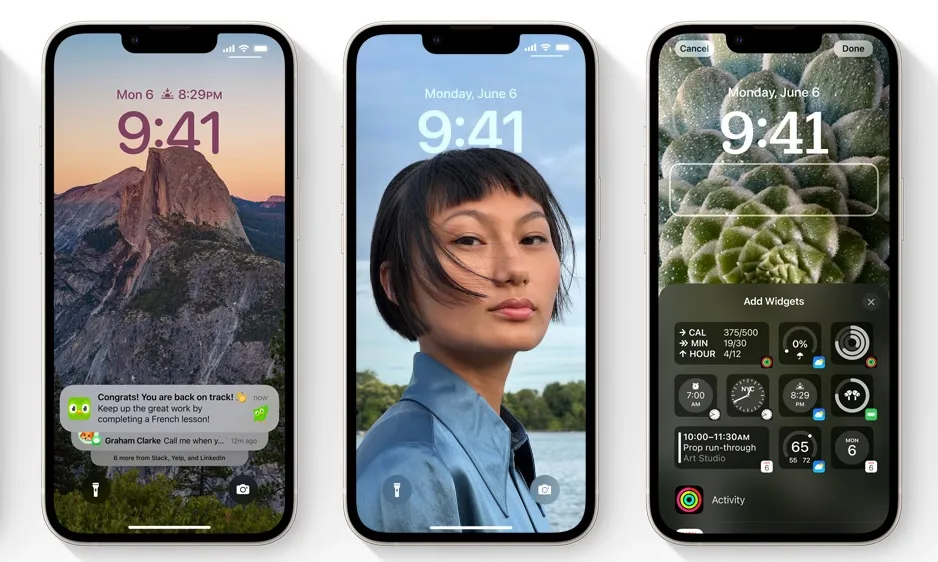
iOS 16 is the sixteenth and upcoming major edition of Apple's iOS mobile operating system for its iPhone range of products. It was unveiled as the successor to iOS 15 on June 6, 2022, during the company's Worldwide Developers Conference.
Apple has released the first public beta of iOS 16, allowing you to test new features such as a configurable lock screen with widgets, granular settings for different Focus, and an enhanced messaging experience — for both green and blue bubbles — on your iPhone.
ios 16 Features
Users will be able to customize their iPhone's lock screen, unsend, and edit iMessages, schedule emails, and do other things with iOS 16. It will have issues, as with all pre-release software, therefore users should be cautious before downloading it on a device used for work or daily use.
- Copy & Paste Photo Edits - Do you want all of your photos to have the same style, or do you want to improve a whole batch of images? That's possible thanks to the new picture edits copy and paste function, which allows you to copy modifications from one photo and apply them to another with a single tap.
- Updates to the AirPods - With a new dedicated section that appears in the Settings app when AirPods are attached, managing AirPods settings is easier with iOS 16. iOS 16 also has a new Personalized Spatial Audio feature, which uses the TrueDepth camera to scan your ears and the surroundings around you, offering a personalized listening experience.
- Hidden and Deleted Photo Protection - In iOS 16, you must verify with Face ID or Touch ID before accessing the Hidden and Recently Deleted photo albums. This effectively hides these albums from view if someone knows your device's passcode.
- WiFi Password - If you've ever been annoyed by being unable to access the WiFi password of the network you're using, iOS 16 will change that. The password of the network to which you are connected can be found in the iPhone's WiFi settings.
- Face ID in Landscape Mode - Face ID in landscape mode is supported by iPhone models running iOS 16, making it easier to unlock the iPhone when it is not held in the typical portrait orientation. The feature is only available on iPhones 13 and later.
- Notes Passcodes - Instead of establishing a new password for a note, you can now lock it with your device passcode or Face ID/Touch ID, which is considerably easier.
- Haptic Feedback for Keyboard - In iOS 16, there is a keyboard setting that allows you to enable haptic feedback while typing. The vibrations occur for each key pressing, giving consumers tangible proof that they have pressed a letter.
- Pinned Safari Tabs - You could formerly pin a Safari tab on Mac, but pinned tabs did not work with iOS 15. This has changed in iOS 16, and you may now pin your favorite tabs, even those in Tab Groups.
- Duplicate Contacts Merge - Are you tired of having numerous contact cards for the same person? You may merge duplicate contacts in iOS 16 directly from the Contacts app.
- Remove Duplicate Photos - The iOS 16 Photos app can notify you if you have numerous photos of the same thing, allowing you to delete the extras to conserve space. Duplicate images show in a new "Duplicates" album if you have duplicates to deal with.
ios 16 Lockdown Mode
Essentially, Lockdown Mode improves iOS security by restricting some functions that may be exposed to attack: Other than photos, most message attachments are banned, and functionality such as link previews are disabled.
Lockdown detects and removes trackers and malware from all of your apps, preventing an estimated 100 million trackers every month for over 300,000 users. — All-In-One Security — Lockdown has two privacy options: a firewall and a Secure Tunnel VPN.
The search function in the Settings app is the quickest way to find the option. The user can either open the app or slide down from the top to find the gear icon and tap it to open Settings. The necessary control can be found by typing 'lockdown' into the search box at the top of the screen.
I hope this was helpful. Thank you. Have a great day ahead!!
-original.webp)
-original.webp)
-original.webp)
-original.webp)